

Google Already Changed reCAPTCHA. Here Is What That Means for Your Los Angeles Business Website.
THE SHORT ANSWER
Google completed its reCAPTCHA migration in early 2026. Every business website running reCAPTCHA Classic has either already been moved to Google Cloud automatically or will stop working correctly if it has not. The free tier still exists at 10,000 form submissions per month, but it now requires a Google Cloud account with billing set up. If your contact form uses reCAPTCHA and nobody on your team has done this, your form protection may already be silently failing. Contact Form 7 now officially recommends switching to Cloudflare Turnstile, which is free with no billing account required. IT Accuracy catches and fixes exactly these kinds of changes before they cost Los Angeles businesses leads or create security gaps.
IT Accuracy | Managed IT Services, Los Angeles | Date: May 17, 2026 | 10 min read

AT A GLANCE
AT A GLANCE
Your contact form probably has reCAPTCHA on it. You may not know this. It was likely added when the site was built and nobody has touched it since. That was fine until early 2026, when Google finished migrating all reCAPTCHA users to its paid Google Cloud platform. For most Los Angeles small businesses, nothing broke immediately. But the conditions for something breaking are now in place, and the fix takes about twenty minutes.
What reCAPTCHA Actually Is
When someone fills out the contact form on your website and clicks Submit, something runs in the background to check whether the person submitting is a real human or an automated bot. That invisible check has almost certainly been handled by Google reCAPTCHA, which is the technology behind the “I am not a robot” checkbox and the newer invisible version that just watches how you move your mouse and type.
That arrangement worked well for a long time. It no longer works the same way it did.
In early 2025, Google announced it was migrating all reCAPTCHA Classic users to reCAPTCHA Enterprise, its paid Google Cloud product. The migration happened in phases throughout 2025. By Q4 2025, Google began automatically migrating Classic keys. By Q1 2026, the automated migration was complete and API access was locked for keys without a Google Cloud project attached.
The good news is that there is still a free tier. reCAPTCHA Enterprise allows 10,000 assessments per month at no cost. For most small business websites, 10,000 form submissions per month is far more than enough. The problem is not the cost threshold. The problem is what happens if you cross it without billing set up, and the problem is the requirement to connect your reCAPTCHA key to a Google Cloud project in the first place.

What the reCAPTCHA migration means in plain numbers
Free monthly assessments
10,000
Per month at no cost. Most small business sites never approach this.
What happens without billing set up
Forms fail
reCAPTCHA returns errors once quota is exceeded with no billing on file
Migration completion
Q1 2026
Automated migration complete. API access locked for unmigrated keys.
The silent failure most businesses do not know about
If your reCAPTCHA key was automatically migrated by Google but nobody on your team linked it to a Google Cloud project with billing enabled, your form protection is operating in a degraded state. If you exceed 10,000 assessments in a month without billing, new reCAPTCHA requests will start returning errors. Your contact form may appear to work from the user’s side but fail silently on the verification side, letting bots through or blocking legitimate submissions entirely. Most business owners have no idea this is happening.
Who Is Actually Affected
The businesses most at risk from this change are the ones who did not build their own website. That is most small businesses. If you hired a developer or an agency to build your site, they likely installed reCAPTCHA as part of Contact Form 7 or another form plugin, connected it with a Google account that may belong to them rather than you, and moved on. The key may now be migrated to a Google Cloud project you have never heard of, tied to an account you do not control.
This is especially common in Los Angeles, where most SMBs in law, healthcare, hospitality, and construction use WordPress with Contact Form 7 on websites that were built by a freelancer or small agency years ago. The person who set up reCAPTCHA may no longer work for you or may not even be in business anymore. The reCAPTCHA key is still running. The Google Cloud project it should be attached to may or may not exist.
Even if everything migrated correctly, there is a secondary problem: Google Cloud requires a billing account to be set up even if you plan to stay within the free tier. If the account was not set up, and you start receiving enough form submissions to cross 10,000 in a month, reCAPTCHA will stop verifying new requests and return errors until billing is configured.
A practical test you can run right now
Go to your contact form page and open your browser’s developer console (press F12, then click Console). Submit a test message through the form. If you see any errors referencing Google reCAPTCHA, a 403 status, or a message about exceeding quota, your reCAPTCHA is not working correctly. If you see no errors, your migration either completed properly or your site is using Cloudflare Turnstile already. Either way, confirming this takes two minutes and is worth doing today.
Cloudflare Turnstile: The Free Alternative Contact Form 7 Now Recommends
Contact Form 7 is the most widely used contact form plugin for WordPress. As of version 6.1, released in 2025, it natively supports Cloudflare Turnstile as a built-in integration. The plugin’s official documentation now states directly that it recommends Turnstile over reCAPTCHA unless there is a specific reason to use Google’s product.
Cloudflare Turnstile is free. Not free up to a threshold with billing required beyond that. Free. There is no Google Cloud account to set up, no billing information to enter, and no migration to manage. You create a free Cloudflare account, generate a site key and secret key, paste them into the Contact Form 7 integration settings, and every form on your site is protected immediately.
From a user experience standpoint, Turnstile is also better. It runs in the background and verifies visitors without requiring any interaction in the vast majority of cases. It does not collect user data for advertising purposes and is designed to comply with GDPR and CCPA out of the box. For Los Angeles healthcare practices and law firms with privacy compliance obligations, this matters.
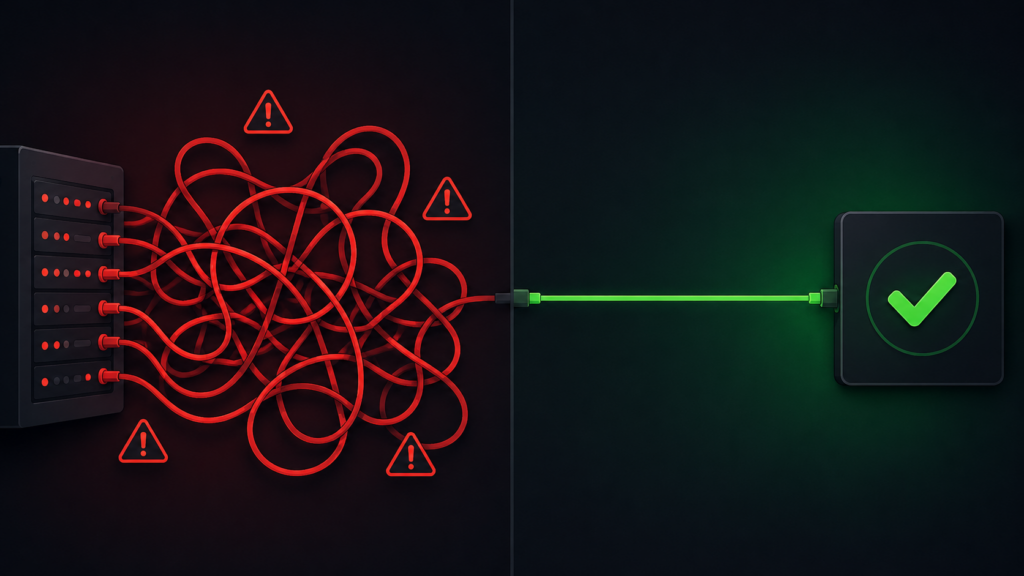
reCAPTCHA Enterprise (Google)
What it now requires
- Google Cloud account with billing enabled
- Key migration from Classic to Enterprise
- Free up to 10,000 assessments per month
- Charges apply if billing is set up and you exceed the threshold
- Forms fail silently if quota exceeded without billing
- Google data collection and privacy policy applies
Cloudflare Turnstile (Recommended by CF7)
What it requires
- Free Cloudflare account with no billing required
- Site key and secret key copied into CF7 settings
- No assessment limits or quota thresholds
- No migration needed, no existing setup to fix
- Privacy-first design, no ad tracking
- Works immediately after setup, all forms protected
Why This Matters for Los Angeles Businesses Specifically
Every inquiry that comes through a broken contact form is a lead that disappears without trace. For a law firm handling personal injury or employment cases, one missed inquiry represents thousands of dollars in potential fees. For a medical practice, a failed form submission from a new patient means they called a competitor instead. For a hospitality business or contractor, a quote request that did not go through is revenue that went somewhere else.
Los Angeles is a high-competition market in every one of these verticals. The businesses that stay visible and reachable online win a disproportionate share of new clients. A contact form that appears to work on the surface but is silently failing on bot protection — letting spam through, blocking legitimate submissions, or degrading slowly as the reCAPTCHA key loses its connection to a valid Google Cloud project — is a liability that most owners will not discover until they notice a drop in inquiries and cannot explain why.
IT Accuracy monitors exactly these kinds of infrastructure changes for its Los Angeles clients. The reCAPTCHA migration is not a dramatic security incident. It is a quiet change to a background service that most businesses did not know they were running. That is precisely the kind of thing that gets missed without someone actively watching for it.

What to Do Right Now
There are three things worth doing this week regardless of whether your forms appear to be working.
Three actions for Los Angeles business owners this week
Check which CAPTCHA your contact form is using. Log into WordPress and go to Contact > Integration. If you see reCAPTCHA listed as active, you have a Google dependency that needs to be reviewed. If you see Turnstile listed, you are already on the better option. If you see nothing configured, your forms may have no spam protection at all.
If you are on reCAPTCHA, confirm your Google Cloud project exists. Go to console.cloud.google.com and check whether your reCAPTCHA key is attached to a project with billing enabled. If you cannot access this account, or if the account belongs to a former developer, that is a problem that needs to be addressed. Your form protection may be running on borrowed time.
Consider switching to Cloudflare Turnstile. If you are already on Contact Form 7, the switch takes under twenty minutes. Create a free Cloudflare account, generate keys, paste them into CF7 Integration settings, and you are done. No billing. No quota. No future migration required. IT Accuracy can handle this as part of a routine site maintenance check if you would rather not do it yourself.
How IT Accuracy keeps Los Angeles business websites running correctly
We catch the background changes that break things before your clients notice.
The reCAPTCHA migration is one example of a recurring pattern: a vendor makes a change to a service your website depends on, nobody tells you about it, and something quietly stops working. IT Accuracy manages the technology environment for Los Angeles businesses so that these changes get caught and addressed before they cost you leads, create security gaps, or require emergency fixes.
For businesses that want their website to work reliably without hiring a full-time IT person, this is exactly what managed IT services covers.
Website security topic cluster: related reading

Managed IT Services | Los Angeles, CA
IT Accuracy provides cybersecurity and security awareness training, managed network services, cloud solutions, and help desk support for businesses across Los Angeles and nationwide.